Prusa
  • SHOP
    • Learn more
    • All deals
    3D printers
    • CORE One+ (Gen2)
    • CORE One L+
    • XL+
    • MK4S
    • Mini+
    • HT90
    Consumables and Merch
    • Prusament
    • Resin
    • Buddy filament
    • Merch
    • Accessories
  • SHOP
    • Latest products
    BY CATEGORY
    • 3D printers
    • Upgrades
    • Materials
    • Accessories
    • Spare parts
    • Courses
    • Merch
    • Sales inquiry & Price quote
    QUICK LINKS
    • Shipping information
    • Refunds & returns
    • Payment options
    • Warranty
    • VAT & Customs fees
    • FAQ

    0 item in your cartitems in your cart

    Your cart is empty

    Go to cartShop 3D printers

    My profile

    Log in to see orders, saved items

    My profile

    Signed in as

    • Orders
    • Logout
  • 3D PRINTING
    • Explore 3D printing
    FOR BEGINNERS
    • 3D printing 101
    • Types of printers (FDM/SLA)
    • How to choose a 3D Printer
    • Printables (3D models)
    BY APPLICATION
    • Rapid prototyping
    • Manufacturing
    • Engineering
    • Research
    • Arts & design
    GO DEEPER
    • Materials guide
    • Courses
    • Webinars
    • Case studies
    • Custom 3D printing
  • 3D PRINTERS
    • All 3D printers
    FOR
    • Home or garageHobbyists, tinkerers and home printing
    • Shop or studioIn-house production for small teams
    • EnterpriseFleets, security and scale
    • How to choose a 3D Printer
    SHOP & BROWSE
    • CORE One+
    • CORE One+ INDX
    • CORE One L+
    • CORE One L+ INDX
    • XL+
    • MK4S
    • Prusa Pro HT90
    • Prusa Pro AFS
    • Prusa Pro SLX
    MORE FROM PRINTERS
    • Upgrades
    • Spare parts
    • Critical infrastructure
    • Case studies
    • Signature Oak
    • Kits
  • MATERIALS
    • All materials
    BY USE
    • Every-day & design
    • Functional engineering
    • Composites
    • Pro speciality
    • SLA resins
    PRUSAMENT
    • PLA
    • PETG
    • ASA
    • PC
    • PA11
    • Flex
    • TPU
    MORE FROM MATERIALS
    • Materials guide
    • We make material in house
    • Sustainability
    • Order on the store
  • SOFTWARE
    • All software
    PREPARE THE PRINT
    • PrusaSlicer
    PRINT & MONITOR
    • Prusa Connect
    • EasyPrint
    • iOS & Android app
    • Prusa Farm
    GET STARTED
    • Download & install
    • Knowledge base
    MORE FROM SOFTWARE
    • Printables (3D models)
  • SUPPORT
    • Explore support
    FIND ANSWERS
    • Knowledge base
    • Troubleshooting
    • Courses
    • Webinars
    GET HELP
    • Contact us
    • Livechat
    • Shipping information
    • Warranty
    • Refunds & returns
    • Spare parts
    • Factory repair
    COMMUNITY
    • Forum
    • Reddit
    • Printables
  • TRUST CENTER
    • Trust Center overview
    BY TOPIC
    • GDPR
    • Certificates
    • Security
    • Compliance
    COMMITMENTS
    • Sustainability report
    TALK TO US
    • Contact the security team
  • COMPANY
    • About Prusa
    GET TO KNOW US
    • Our story
    • How we make printers
    • Open source
    • Brand & media kit
    NEWS
    • Blog
    • Newsroom
    • Events
    TRUST & PARTNERS
    • Sustainability
    • Resellers & distributors
    • Affiliate program
    • Contact
    • English
    • Čeština
    • Deutsch
    • Español
    • Français
    • Italiano
    • Polski
    • 日本語
  • Signed in as

    • Orders
    • Address
    • In-stock Alerts
    • My Courses
    • Subscription
    • Edit Account
    • Logout

Log in to see orders, saved items

Signed in as
  • Orders
  • Address
  • In-stock Alerts
  • My Courses
  • Subscription
  • Edit Account
  • English
  • Čeština
  • Deutsch
  • Español
  • Français
  • Italiano
  • Polski
  • 日本語
Shop

0 item in your cartitems in your cart

Your cart is empty

Go to cartShop 3D printers

My profile

Log in to see orders, saved items

My profile

Signed in as

  • Orders
  • Logout
SHOP
  • Latest products
BY CATEGORY
  • 3D printers
  • Upgrades
  • Materials
  • Accessories
  • Spare parts
  • Courses
  • Merch
  • Sales inquiry & Price quote
QUICK LINKS
  • Shipping information
  • Refunds & returns
  • Payment options
  • Warranty
  • VAT & Customs fees
  • FAQ

Featured products

    Popular categories

      Trending searches

        Products

          Articles

            Blog

              Categories

                Suggested searches

                  Searching…
                  No results
                  Something went wrong.
                  ↑↓ Select↵ OpenEsc Close search
                  1. Education
                  3D printing in education3D printing classroomTrainingContestsProjectsRegistration

                  How to use 3D printing in Education?

                  How to use 3D printing in Education?

                  3D printing builds students’ creativity and imagination, but it also teaches them how to apply these skills in real life – to explore usability and practicability, and test the limits of their knowledge and the possibilities of the technology.

                  The opportunity to turn their own idea into reality is very satisfying, motivating them to finish even longer and more complicated projects. It allows them to collaborate and actively research information – these technologies are built on a community that shares its knowledge with each other. It illustrates phenomena from different school subjects at the same time, from geometry in drawing a 3D model to chemistry and physics in exploring the properties of different materials in printing (melting point, hardness, elasticity, thermal expansion, etc.).

                  Operating a 3D printer is no more complicated than operating a conventional computer and it is easy for students and teachers to acquire the necessary knowledge. 3D printing technology is no longer just the preserve of scientists and technology enthusiasts but has something to offer you and your school.

                  We have been using 3D printing for several years

                  We have been using 3D printing for several years now in almost all professional sections of our Technical Youth Club in Litoměřice. We use it to produce, for example, parts of functional models of aircraft and ships, or projects in electrical engineering and robotics. We even print accessories for our sewing workshop.

                  Zbyněk Rudolf

                  Zbyněk Rudolf • Head of department TKM Litoměřice

                  Sample projects gallery

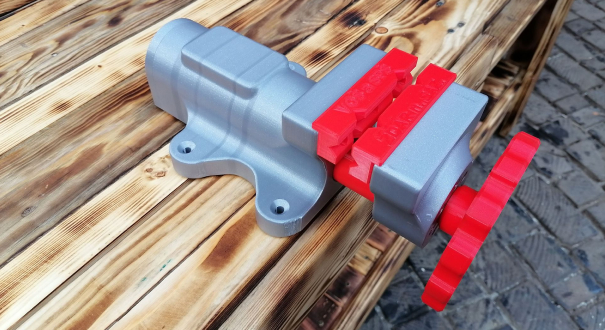
                  Workshop vise

                  Design and manufacture of a small workshop vise, similar to the type offered by the YORK vise manufacturer. Technically oriented disciplines, technical schools, technical clubs.
                  Workshop vise

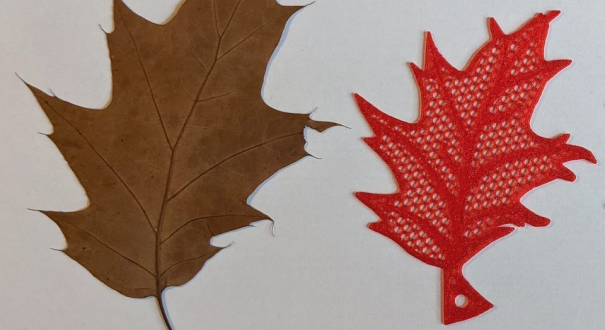
                  Getting to know leaves and PrusaSlicer

                  Students will convert real autumn leaves into a 3D model, which they will then edit in Slicer and prepare for printing. Recommended for elementary school students, approximately 4th - 6th grade. Good to combine with, for example, art or work activities. It is also possible to combine the production with the subsequent recognition of the individual leaves and their matching in a science subject.
                  Getting to know leaves and PrusaSlicer

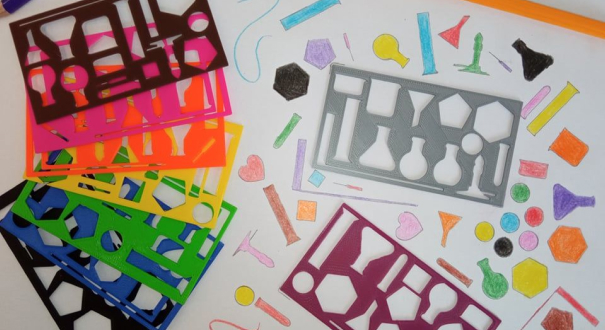
                  Chemical template

                  Students will model and print a template for drawing chemical glassware and formulas (TinkerCad tool). Alternative: Pupils model and print the template as an aid to any other subject.
                  Chemical template

                  3D solid model in GeoGebra

                  Students model a 3D solid in the mathematical application Geogebra. In it, they mark the most commonly used segments (diagonals, heights,...) and also cuts (triangles, rectangles,...).
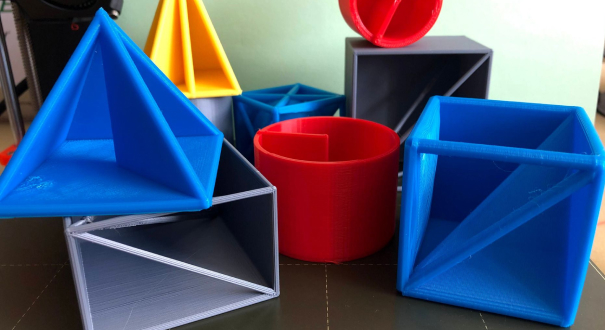
                  3D solid model in GeoGebra

                  Well, you have an interesting idea, for using 3D printing in your classroom?

                  Create a project and share it with others.

                  Robotic Arm controlled by Arduino system

                  As part of the project, students will print and assemble a robotic arm on a 3D printer, which will be used to teach the wiring of electronics and learn how to control it using the Arduino system.

                  Molecular magnetic kit

                  Pupils together with the teacher will build a kit of calotte models, which will then be used in organic chemistry lessons.

                  Tit feeder attached to the window pane

                  Students create different prototypes of a titmouse feeder and discuss their models and then the printed result.

                  A tool for training basic paddling knots

                  The children will model a simple tie to tie the knot according to the instructions. After printing, they simply screw the tie onto a small wooden plate and can start learning how to tie a knot.

                  Smart Plant Pot

                  The students design, process and print out parts of a smart plant pot which will be used for automated plant cultivation.

                  Map of Europe including flags

                  A simple tool for determining the geographical location of the countries of Europe, including the recognition of national flags. The tool is designed for II. Grade of primary schools.